Quiz Maker (Beta)
Publisher Description


Get professional and standard in-development features before everyone else!
This is the early access version of QuizMaker.
It includes all QuizMaker professional features and goes further by offering beta and in-development features that we're still working on.
Before all, please choose well your distribution:
If you are looking for the standard, totally free and without ads distribution of this app, please found it here:https://play.google.com/store/apps/details?id=com.devup.qcm.maker
In another hand, if you are looking for the professional distribution that offers the same features as this app with paid plans and an ads-based alternative plan. It includes a trial period that offers a full access for seven(7) days, please found it here: https://play.google.com/store/apps/details?id=com.qmaker.qcm.maker
The target!
This "QuizMaker plus" distribution is intended for users who want all features from the professional distribution at the same time as all in-development and upcoming without having to pay even a single dollar.
Thus, what is QuizMaker app?
Quiz Maker is a Mobile Application that allows you to play, create and share quizzes in a simple and intuitive way.
The questionnaires created using QuizMaker app are in the form of interactive test quizzes that may contain pictures and sound with automatic scoring.
Thus, you can create your own quiz, play it and share it for self-evaluation or for entertainment gaming purposes.
The Quiz Maker application offers the possibilities to:
-Make your own quiz by creating:
1• multiple-choice questions
2• single answer questions
3• open-ended questions with single
4• open-ended with multiple answers
5• Enumeration
6• Fill the blanks
7• Match columns
8• Put in order
-Share your creations easily as a (*.qcm file)
-Receive, and play quizzes shared or received from your contacts as a simple portable and shareable file with extension *.qcm.
>What is a *.qcm file?
•Qcm file is file format that aims to supports interactive quizzes including pictures & sounds with automatic scoring.
•A *.qcm file is a compressed file that contains a set of questions, proposals, and answers.
•The structure of the files * .qcm makes it possible to embark among others multimedia contents such as images and sounds.
•Each * .qcm file is structured so that it is interpreted automatically by any compatible application.
> How does it work?
Quiz Maker is a reader and an editor for file with *.qcm extension. It thus makes it possible to
manage, read and execute
quiz/questionnaire files that are on your storage disk.
Moreover, from its editing feature; it allows you to edit quiz files through a simple and intuitive interface so that you can easily create your own quiz file from scratch or modify an existing one.
When you edit a quiz, you can at anytime share it as a shareable *.qcm file so that anyone with Quiz Maker or a compatible *.qcm reader can easily read and execute it.
About Quiz Maker (Beta)
The company that develops Quiz Maker (Beta) is QmakerTech. The latest version released by its developer is 1.0 .
To install Quiz Maker (Beta) on your Android device, just click the green Continue To App button above to start the installation process. The app is listed on our website since 2026-09-10 and was downloaded 19 times. We have already checked if the download link is safe, however for your own protection we recommend that you scan the downloaded app with your antivirus. Your antivirus may detect the Quiz Maker (Beta) as malware as malware if the download link to com.qmaker.qcm.maker.plus is broken.
How to install Quiz Maker (Beta) on your Android device:
- Click on the Continue To App button on our website. This will redirect you to Google Play.
- Once the Quiz Maker (Beta) is shown in the Google Play listing of your Android device, you can start its download and installation. Tap on the Install button located below the search bar and to the right of the app icon.
- A pop-up window with the permissions required by Quiz Maker (Beta) will be shown. Click on Accept to continue the process.
- Quiz Maker (Beta) will be downloaded onto your device, displaying a progress. Once the download completes, the installation will start and you'll get a notification after the installation is finished.
Program Details
System requirements
Download information
Pricing
Version History
version
posted on 2026-09-11
New features for beta Tester
- Complete overhaul of the game interface (challenge and exam)
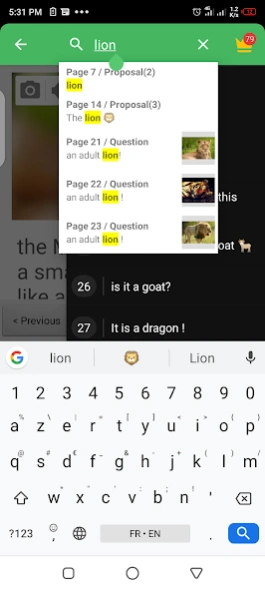
- Added in beta a feature to extract Q&A from any kind of document using AI
- Added in beta a feature to generate questions using an AI assistant
- Ability to specify a strategy of evaluation for an answer that requires the user to manually type the answer (Th answer should be equal, should contain a specific text, or should match a specific pattern [REGEX])
version
posted on 2025-07-24
New features for beta Tester
- Added in beta a feature to extract Q&A from any kind of document using AI
- Added in beta a feature to generate questions using an AI assistant
- Ability to specify a strategy of evaluation for an answer that requires the user to manually type the answer (Th answer should be equal, should contain a specific text, or should match a specific pattern [REGEX])
version
posted on 2025-04-23
New features for beta Tester
- Added in beta a feature to generate questions using an AI assistant
- Ability to specify a strategy of evaluation for an answer that requires the user to manually type the answer (Th answer should be equal, should contain a specific text, or should match a specific pattern [REGEX])
version
posted on 2025-03-21
New features for beta Tester
- Ability to replay only the question you missed
- Added settings to customise player behavior
- Added feature to duplicate editing page
- Ability to add an image in the comment section
- Ability to add audio in the comment section
- Ability to specify a strategy of evaluation for an answer that requires the user to manually type the answer (Th answer should be equal, should contain a specific text, or should match a specific pattern [REGEX])
version
posted on 2023-09-11
New features for beta Tester
- Added settings to customise player behavior
- Added feature to duplicate editing page
- Ability to add an image in the comment section
- Ability to add audio in the comment section
- Ability to specify a strategy of evaluation for an answer that requires the user to manually type the answer (Th answer should be equal, should contain a specific text, or should match a specific pattern [REGEX])
version
posted on 2023-07-13
- Updating buildTools to version 7
- Add support for media (image and sound) on the comment section.
- Added an embedded Audio recorder (No more need necessarily to install an audio-recorder app)
- Reported bug fix and improvement
